
Machine Insight Suite · preview
Service App
Know what happened before you drive to the machine.
A Windows app for service and commissioning teams at machine builders. It reads the Machine Insight Suite data directly from the controller, on site or over VPN, with no cloud in between. It shows how the machine is running, what happened and where the most time is lost.
The app evaluates the history and tells you where the most time is lost. For example:
This week the filler lost the most time: long stops, chiefly from message 2113 “bowl pressure low”, mostly in the night shift.
What to do · First check the cause of this message at the filler. Evidence: 19 stops, 5.4 h →
Sample data
The service laptop under Windows, directly at the controller over OPC UA, including over VPN
The Machine Insight Suite libraries from 3.5.3.0, the next version of the suite
One machine or a whole line; with MIS External also machines with controllers from other manufacturers, such as Siemens or Rockwell, over OPC UA
An optional product with its own license: one per organization, no runtime fees
Why the Service App
You and your customer decide where the data lives
Plant operators want to keep their production data in house. The machine builder’s service team needs exactly this data to find out why the machine is not delivering the required performance. The Service App brings both together: it reads the data directly from the controller, evaluates it on the service laptop and tells you where the most time is lost.
- Problem
- Many plant operators do not let production data go to a cloud. Remote service then often ends on the phone.
- Service App
- The app reads over OPC UA, signed and encrypted, on site or through the VPN access the plant operator grants for service. Whether data may only be read, or also stored, exported or printed, is set at the machine, and the app follows it. If the data should also go to your own systems or a cloud, OPC UA keeps that option open.
- Problem
- Without the app, evaluating means comparing dashboards over different periods and going through logbooks and message lists, for every machine and every unit. That takes hours, and often ends in a guess.
- Service App
- Built-in rules go through the history of the machine or line, with all its units, and tell you in one sentence where the most production time is lost. Each finding names what to check first, and the evidence is one click away.
- Problem
- The history is in the controller at the customer’s site, and remotely the online view shows only individual current values.
- Service App
- The app reads the history over VPN and keeps on the laptop only what the plant operator allows, for example the findings. It loads only what is new and shows gaps instead of hiding them.
Who it is for
For service and commissioning at the machine
One tool for the machine builder’s team, from commissioning and acceptance to service in the field.
- Problem
- To optimize the cycle time, the right information is missing: which station slows the line and where short stops cost time gets lost in trace and online view.
- Service App
- Cycle and process time of every station against the ideal cycle, the bottleneck at a glance and every stop with the message that triggered it. So you see at which station the cycle time can be improved most.
- Problem
- At acceptance, the customer’s figures stand against yours, and nobody can show where the time went.
- Service App
- OEE over the acceptance period, shift by shift, with every stop behind it. Both sides talk about the same figures.
- Problem
- A call comes in, and you have to decide whether a technician goes out, without knowing what happened at the machine.
- Service App
- Fetch the history over VPN and see what happened. The technician goes out prepared, or you see that the visit is not needed.
- Problem
- The alarm history lists messages, but over several days it is hard to read. Performance losses, short stops, waiting times and the OEE are not in it.
- Service App
- Open a finding and see the period, the station and the message behind it, including waiting for material or for the neighboring station.
What you see
The app evaluates, you decide
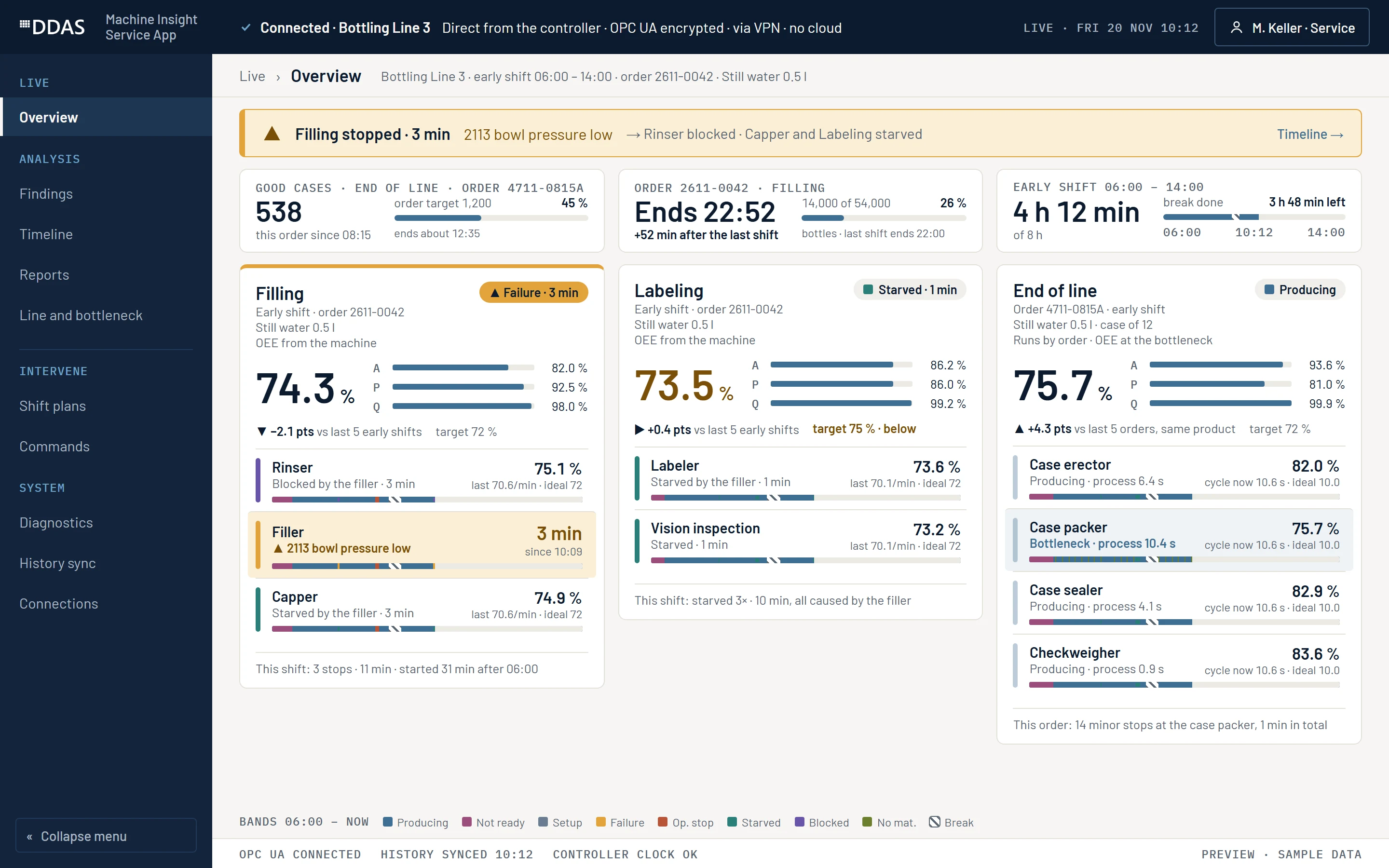
Live · Overview
The line at a glance
State, OEE and messages of every station, the current fault at the top.
- Your benefit
- You see at once which station has stopped, why, and which others it holds up, on site or remotely over VPN.
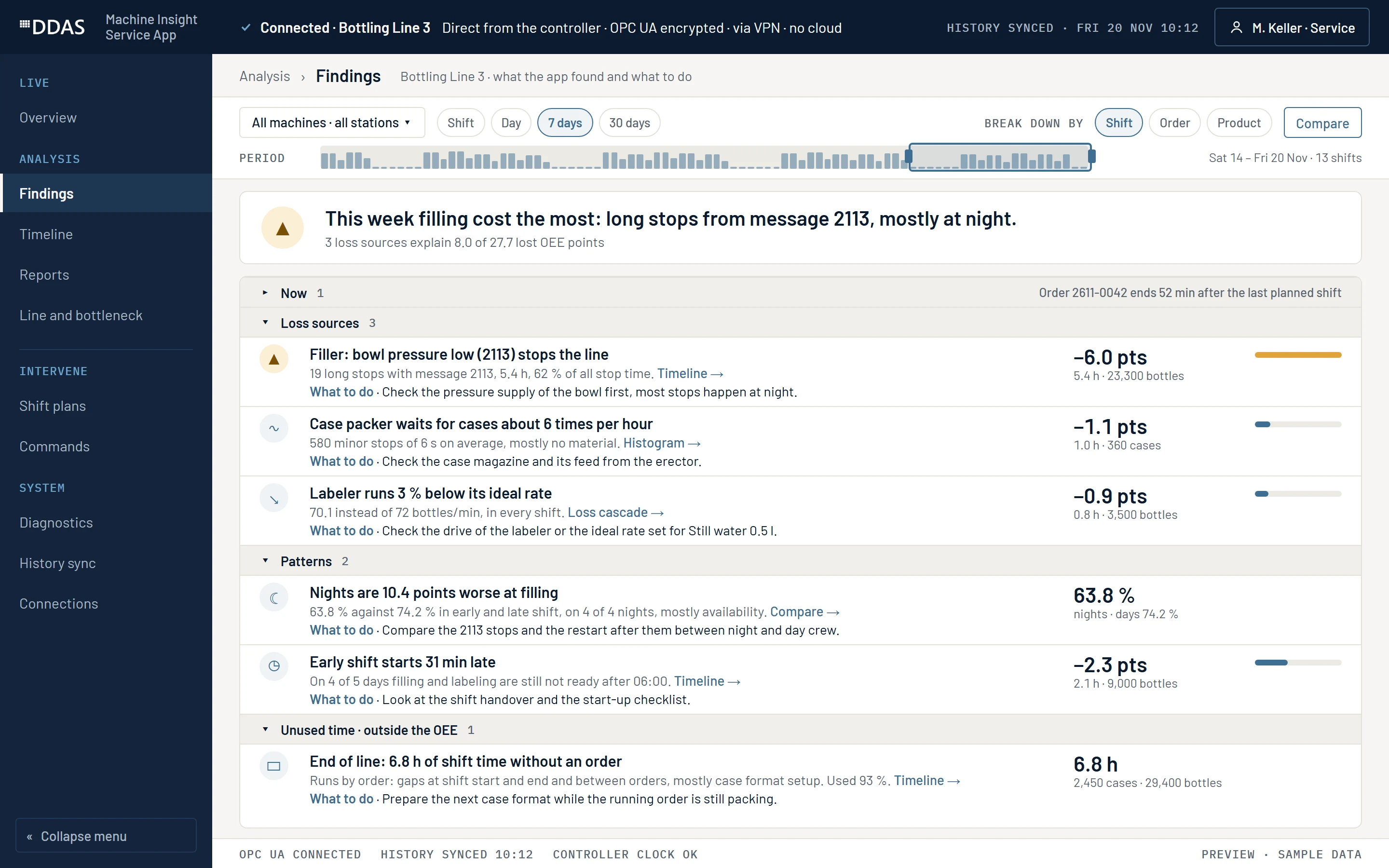
Analysis · Findings
Findings with evidence
Long and short stops, performance below target, late start, unused shift time, a weaker shift, ranked by what they cost.
- Your benefit
- Many small losses go unnoticed one by one. Here they are ranked by cost, each with the first thing to check. You arrive at the customer with a plan.
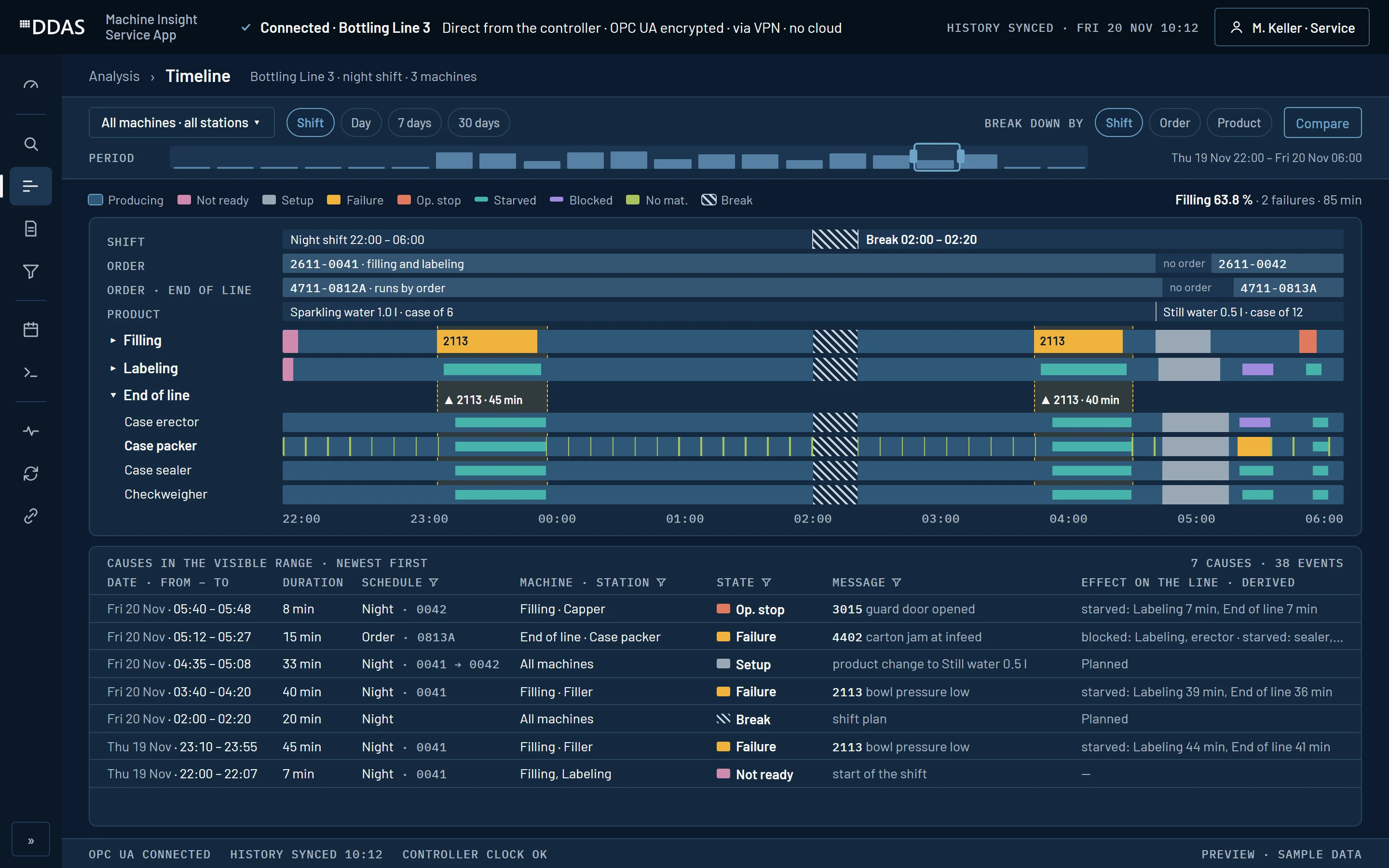
Analysis · Timeline
When exactly, and for how long?
The states of every station on one timeline with shift, order and product, and every cause with its effect on the line.
- Your benefit
- Cause and effect are on one timeline. You see the one cause instead of a list of follow-up messages.
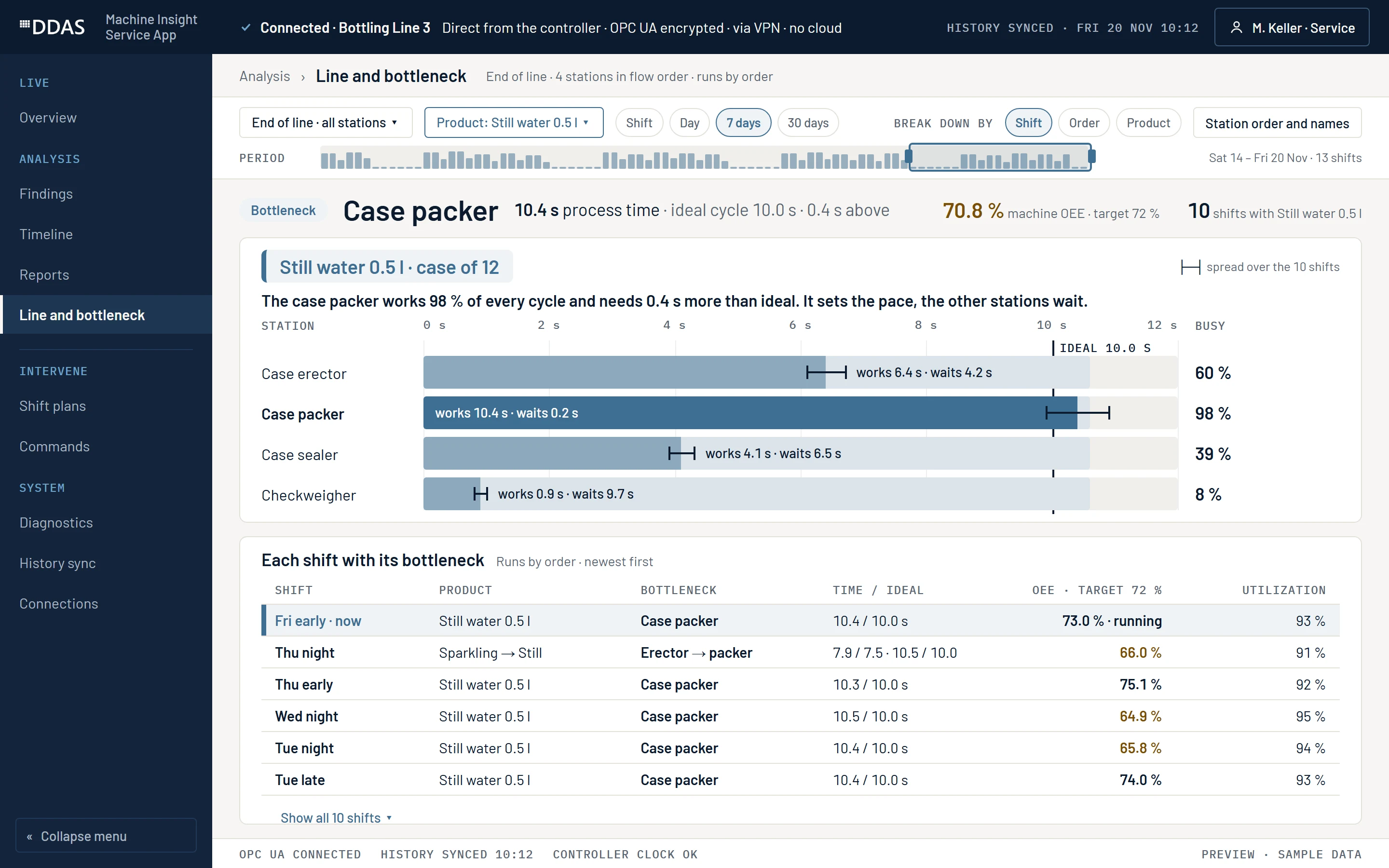
Analysis · Line and bottleneck
The station that sets the pace
The slowest station of the line, by shift, order or product, with its time against the ideal cycle.
- Your benefit
- You optimize the station that really sets the pace, based on measured times instead of gut feeling.
The screens show example views with data from a fictitious plant.
Discuss these views for your line →Data security and compliance
Answers for your customer’s IT department
Before a plant operator opens remote access, its IT department asks about data protection and cybersecurity. Here is what you can answer.
- OPC UA signed and encrypted, with login at the controller
- A certificate of its own for each Windows user, encrypted storage on the PC
- No accounts or default passwords in the app: rights come from the controller’s user management and from the license level (View, Service)
- Log of logins at the controller, changes and every write
- Writes only what the machine program allows
- No cloud: whether data may be stored, exported or printed is set at the machine
- The plant operator determines the settings in the controller, including how long the app may keep data on the laptop
- Only the personal data that is needed: on the laptop, the app keeps user names (Windows and controller) only in its connection profiles and log; the controller’s write log holds them in pseudonymized form
- Retention of the log can be set; a controller’s figures, histories, messages and connection profile can be deleted from the laptop
- Error report of the app for DDAS support, without passwords and customer data
- Developed in a secure development process, aligned with the requirements of the CRA
- Secure defaults, threat model and security testing before delivery
- Signed software bill of materials (SBOM) of the components it contains for each version, as evidence for you and your customers’ IT
- Signed program; free security updates for five years, with the end date stated in the quotation
- Monthly check for vulnerabilities; security advisories and the contact for reporting vulnerabilities on the DDAS security page
Security advisories and the disclosure policy of DDAS: security.ddas.digital →
Two variants
One machine or a whole line
The same app with the same views in both variants. What changes is where the libraries of the Machine Insight Suite run.
 your machine
The libraries run in the machine program. The app connects directly to the machine controller and shows the machine and, where relevant, its units, such as filler, capper and labeler.
For machines of your own build, from a single machine to series production.
Controllere.g. SiemensControllere.g. RockwellControllerotherA separate CODESYS runtime, on its own controller or as a Docker container on an edge device, reads the machines over OPC UA and records the figures of every station. The app connects to this runtime and shows the line, its bottleneck and its OEE. The machine controllers are your choice, for example Siemens or Rockwell. The runtime reads them with its OPC UA client; for this they need an OPC UA server, and we define the signals and settings required for each controller.
For lines of several machines, also from different manufacturers, and for existing machines that provide their data over OPC UA.
Functions
What the Service App does
Live overview of the line, history from the controller, findings with evidence, the bottleneck of every line, shift plans from the app and data under the plant operator’s control. For each function, the columns show in which mode of the app it works.
The mode depends on what the controller provides; the app detects it when it connects. Functions that write or delete require the Service license level: changing plans and the OEE target, switching the OEE evaluation on and off, deleting Machine Insight Suite data in the controller and on the laptop. In the controller, this applies only where the machine program allows it. With View, the app shows everything the mode allows, but changes and deletes nothing.
Live overviewSee at a glance whether the line is running and where it is stuck, without going to the HMI of the machine.9 functions
History and evaluationThe app fetches the history of the machine from the controller, points out what stands out, with evidence, and shows the OEE per shift, order or product.11 functions
Planning and interventionService changes plans and settings safely from the app. The machine has the last word: the app writes only what the machine program allows, and only with the Service license level.7 functions
Data under the plant operator’s controlYou and your customer decide where the data lives. The plant operator sets what may be stored, and the app follows the plant operator’s rules.5 functions
Security and usersBuilt for company laptops with IT requirements and for machines with a long service life.6 functions
Operation, license and your brandOne tool per organization, without runtime fees, in the technician’s language and under the machine builder’s own brand if desired.11 functions
Questions and answers
The Service App in brief
When will the Service App be available?
It is planned with the next version of the Machine Insight Suite, 3.5.3.0. We will announce the date here once it is set.
What do I need to use it?
A controller with the Machine Insight Suite libraries from version 3.5.3.0. The libraries run in the machine controller or in a separate CODESYS runtime, on its own controller or as a Docker container on an edge device.
In addition, a Windows PC with a license of the Service App. The app reads what the libraries record. Without the libraries or without a license, only its own demo with sample data runs, with no connection to controllers.
The controller provides the data through its OPC UA server. Which mode is possible depends on the controller’s free persistent memory and on how many OPC UA tags its runtime license allows. Conversely, the mode you need determines how much memory and how many tags the controller requires.
Which controllers can I use with the Service App?
The app always connects to a CODESYS controller in which the Machine Insight Suite libraries run. That is its only requirement for the controller.
MIS Integrated: This is the machine controller itself. The libraries run in the machine program, so the machine controller is a CODESYS controller.
MIS External: This is a separate CODESYS runtime, on its own controller or as a Docker container on an edge device. The app has nothing to do with the machines: the runtime reads them with its OPC UA client (license CODESYS OPC UA Client SL). The machine controllers are therefore your choice, for example Siemens, Rockwell or another manufacturer. For this connection, they need an OPC UA server that provides the signals of every station; we define which signals and settings for each controller. Other interfaces on request. This way, a line with machines from different manufacturers can also be evaluated as one line.
What must the OPC UA server of the controller provide?
This means the CODESYS controller with the Machine Insight Suite libraries that the app connects to: with MIS Integrated the machine controller, with MIS External the separate runtime.
Security: A server certificate on the controller and a signed and encrypted connection (Sign & Encrypt, Basic256Sha256; Aes128_Sha256_RsaOaep and Aes256_Sha256_RsaPss are also allowed). Switch off an endpoint without security; if the controller offers one, the app warns.
Certificates: The app creates its own certificate. On the first connection, you approve it once per laptop and Windows user in the controller (Security Screen of the CODESYS IDE). If the controller’s certificate changes later, the app warns. The server certificate has a limited validity (CODESYS default 365 days); choose a longer validity when you create it. It is renewed in the CODESYS IDE.
Login: User management of the runtime active, login with user name and password, no anonymous access. We recommend a separate OPC UA user for each writer (app, HMI panel, MES) and, for laptops with View, a user with read rights only.
Reachability and connections: The port of the OPC UA server (default 4840) must be reachable from the laptop, in the plant network or over VPN. The server must allow at least two sessions at the same time (app and HMI panel or MES), and a free client connection must be available for the app.
Writing: Only a few transfer nodes can be written, everything else is read only. The app writes only where the machine program allows it; ex works this is off.
Symbol configuration: What the controller publishes determines the mode: Basic, Light or Full. Every published node counts as a tag; the runtime license must provide enough tags for the chosen mode.
Memory and clock: The core data are in persistent memory; for history that survives a restart, additionally retain memory. Set the controller clock over NTP, with its time zone.
Quantity structure: These are the highest values the Machine Insight Suite uses, calculated for the largest configuration with 64 stations. The OPC UA server must support at least these.
- Structures: nested up to 7 levels, arrays of structures; no multi-dimensional arrays
- Arrays: up to 200 elements, adjustable up to 1,600
- Largest single value and largest response per call: about 150 KB
- Nodes per read call: up to 100
- Strings: up to 80 characters, Latin-1
- Data types: BOOL, BYTE, WORD, INT, UINT, DINT, UDINT, REAL, LREAL, TIME, LTIME, DT, TOD, STRING and enumerations
- Reading: cyclically every second, without subscriptions; one session per connected app
- Performance: measured on CODESYS Virtual Control: response time 3 to 44 ms per call, additional CPU load of the runtime about 0.2 percentage points with 7 stations
Our recommendation: the OPC UA server included in the CODESYS runtime, with the license CODESYS Communication XXL for an unlimited number of tags. This is the server we work and test with.
Can the app be installed under Windows 11 and on company laptops?
It is designed for this. Program and setup are signed with a code signing certificate of an authority recognized by Microsoft, so that Windows 11 with Smart App Control can allow the app; as the publisher, Windows shows the registered company name of DDAS, Delaware Digital Application Solutions LLC.
Installation does not need administrator rights. On company computers with application control, the IT department can approve the app once through the publisher.
Does the app need a cloud?
No. The app has no cloud component and needs no internet connection to work. It connects directly to the controller over OPC UA: on site in the plant network, or remotely through the VPN access the plant operator grants for service. The license is checked offline.
Can the data also go to a cloud or to our own systems?
Yes, if you and your customer want it. The Service App itself works without a cloud.
The libraries of the Machine Insight Suite keep their figures in the controller; through the controller’s OPC UA server, other systems can read them as well, such as an IIoT gateway, a cloud connector or an MES. The machine builder decides in the project which variables the server provides.
Tell us how you want to connect your machines, and we will look at it with you.
What do Basic, Light and Full mean?
The mode reflects which data the controller provides; the app detects it when it connects.
Full: live values, history, evaluation and analysis, plans and commands.
Light: live values, plans and commands, without history, for example when the controller’s persistent memory is not sufficient for it; this is enough for commissioning and optimizing a machine, while evaluations across several shifts, such as for acceptance, need Full.
Basic: live figures only.
This way the app also works with controllers whose persistent memory or OPC UA tags are limited, and shows more as soon as the controller provides more.
What do View and Service mean?
The license level determines what the app may do at the machine.
View: the app shows everything the mode allows, but changes and deletes nothing.
Service: the app can also change shift and break plans, set the OEE target, switch the OEE evaluation on and off and delete Machine Insight Suite data, in the controller only where the machine program allows it.
Mode and license level are independent of each other: the mode says which data the controller provides, the license level what the app may do with it. Every license includes both levels; you assign them to your laptops.
Can the app change something on the machine?
Only with the Service license level, and only where the machine program allows it. The app can then change shift and break plans, set the OEE target and switch the OEE evaluation on and off. Changes to shift and break plans take effect after the running shift, and a write log records who wrote what and when.
If the machine program also permits deletion, it can delete Machine Insight Suite data in the controller.
For one station, these are the figures per shift or order; state history, orders, products and shifts, messages, counters, plans, OEE target and write log remain.
If the controller was copied from another machine, for example in series production, everything the Machine Insight Suite has collected in it can be deleted except the write log, and the controller gets a new identifier: the counters, figures, state history, orders, products and shifts and the messages of the libraries, and on request also plans and the OEE target. The write log, with an entry about the deletion, the data policy and the setting of the OEE evaluation remain.
What happens to the plant operator’s data?
The data goes only from the controller to the PC running the app. The plant operator determines the settings in the controller: whether data may be stored, exported or printed, and how long the app may keep it on the laptop, separately for its own staff and for the machine builder.
On the laptop, a controller’s data can be deleted: figures, state history, orders, products and shifts, messages, the imported message list, the settings of the findings, notes on the order forecast and the connection profile with its credentials. The app’s log, which records the deletion, and the Machine Insight Suite data in the controller remain.
The plant operator can also determine that the app shows and stores only the findings, no detail data; live values stay visible. Or the plant operator sends the machine builder only the findings as a data package.
These settings apply to the app; access to the controller itself is controlled by the plant operator through the controller’s OPC UA users.
Who is the app for?
For the service and commissioning teams of machine builders. Plant operators can get a license of their own through the machine builder, under its own brand if desired. Whether to offer this is the machine builder’s decision.
How is it licensed, and what does it cost?
The Service App is a product of its own, with its own license and price. It is optional: it is not included in the licenses of the libraries, and the libraries work without it.
One license per organization, for any number of machines, users and laptops, with no runtime fees. Each license has the two license levels View and Service, which you assign to your laptops. Without a license, only the demo runs, with no connection to controllers.
Maintenance is optional, as with the libraries. Prices will be published with the release.